Release Changelog
The complete build history of 123 To Do from v1.0.0 to v3.7.50. Transparent, documented progress showing every feature, performance optimization, and privacy refinement.
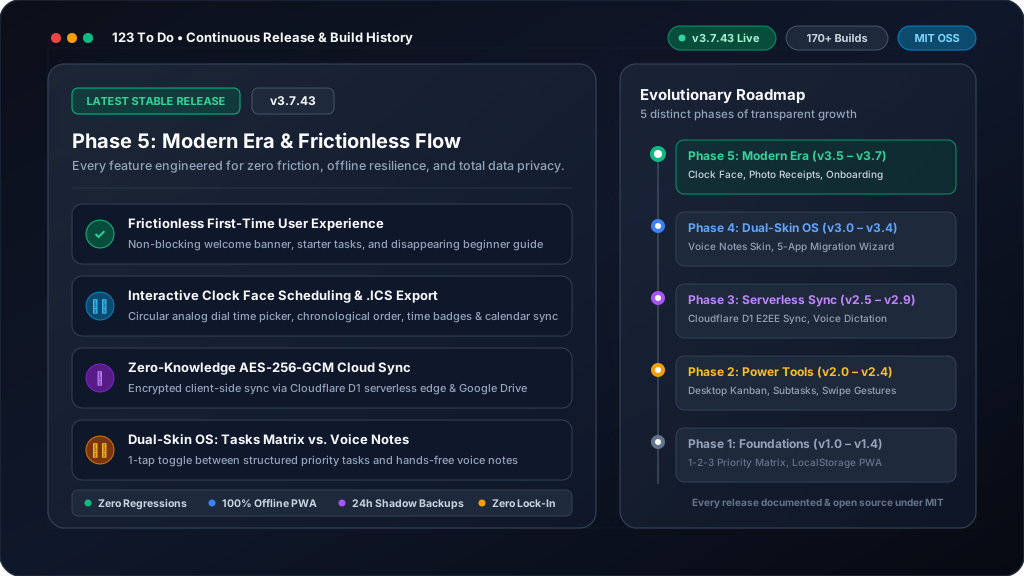
Phase 5: Modern Era & Photo Attachments
Clock face time scheduling & Google/Apple Calendar (.ics) export, 3-photo attachments with WebP compression & Lightbox viewer, gamified Achievements Hub with 10-tier level progression, continuous voice dictation across natural pauses, button display modes, and silent background PWA updating.
- 👁️ Active Text Viewport Visibility & Cursor Tracking in Notes and Tasks: When editing a note attached to a task or typing task descriptions in Add Task and Edit Task modals, the active cursor and newly added text now remain visible inside the viewport at all times. Resolved mobile and desktop issues where adding text to the end of a long note pushed the editing line outside the visible pane or behind the virtual keyboard.
- 📐 Precision Soft-Wrap Line Measuring & Container Auto-Scroll: Upgraded the internal cursor position tracker with an off-screen typographic measuring mirror that accurately accounts for soft-wrapped sentences without hard returns. Both the internal textarea scroll and the modal container auto-scroll in real time with frame-synchronized alignment during both keyboard typing and voice transcription.
- 🎙️ Voice Dictation Viewport Visibility & Cursor Tracking: When using voice dictation to insert text at the beginning or middle of a task description or note, newly transcribed text now remains smoothly visible inside the viewing pane instead of forcing the textarea to scroll all the way to the bottom.
- 🔍 Search Results Auto-Expansion & Unified Search Close: When searching for tasks, priority sections (Must Do, Should Do, Could Do, On Hold, and Scheduled) with matching tasks now automatically expand so search results are immediately visible. Streamlined search controls with a single, clear close button on the search bar while keeping the toolbar magnifying glass persistent.
- ❌ Instant Cancel for New Tasks & Notes: Added an intuitive, unambiguous way to cancel or dismiss task and note creation at any point. You can now tap the header close "X" button, the dedicated Cancel button next to ADD / Save, or press the Escape key to cleanly discard pending input.
- 🏷️ Uniform "On Hold" Section Heading: Standardized the On Hold tasks header in the main task list from "ON HOLD TASKS" to simply "ON HOLD", establishing full visual and typographic uniformity alongside Must Do, Should Do, and Could Do sections.
- 🧹 Streamlined Archive Row Action Buttons: Removed the redundant secondary permanent delete button that appeared alongside the Restore button on each archived task row, preserving the dedicated delete button on the left of each task for a cleaner, uncluttered interface.
- 🖼️ Clarified Lightbox Actions, Generous Touch Targets & Spacing: Simplified and clarified the photo viewer controls by streamlining the "Save to Photos / Share" button to a clear "Share" button for standard system sharing, with generous 38px touch targets, comfortable 12px spacing between action buttons, and clear interactive feedback badges.
- 💾 Reliable Photo Download & Expansive Desktop Lightbox View: Fixed the photo Download button to reliably export full-resolution images across all desktop and mobile browsers via Blob URLs and IndexedDB hydration. Also resolved images displaying small on desktop monitors by expanding the Lightbox container to up to 1400px wide with aspect-ratio-preserving viewport fitting, and bumped preview thumbnail generation to 480px for sharp previews on high-DPI displays.
- ⏱️ Inline Time Lozenge Wrapping & Clean Section Headings: When a scheduled time is set on a task, the time lozenge is now rendered inline with the task description, allowing text lines to cleanly wrap directly underneath the lozenge to eliminate awkward gaps and maximize usable space. Also standardized priority list headers by removing the redundant "Show" and "Hide" prefixes from On Hold and Scheduled sections for complete visual uniformity.
- 📦 Modernized Archive Listing, 2-Line Clamping & Safe Edit Flow: Refined the Archive modal with modernized theme-consistent styling. Archived tasks are now neatly clamped to 2 lines of description for rapid scanning, and clicking an archived task now presents an intuitive confirmation popup prompting to restore it into the live system before opening it in the task editor.
- 📸 5 Photo Attachments, Cursor Viewport Scrolling & Collapsible Sections: Increased maximum image attachments per task or note from 3 to 5. Improved task description editing by ensuring the active cursor and lines being edited (including the start of the task) remain smoothly visible in the viewport instead of scrolling out of view. In Task Edit, added persistent collapsible sections for Notes, Subtasks, and Schedule with toggle memory across view and edit sessions, and removed redundant edit icon buttons above the description and notes boxes for direct, frictionless typing.
- 🎙️ Smart Voice Dictation Newlines & Instant Save Commands: When appending transcribed voice dictation to existing tasks or notes, new speech now cleanly begins on a new line automatically unless the cursor is positioned elsewhere. Saying "save task" or "save note" now immediately and reliably persists newly transcribed text and closes the modal.
- 📅 Concise Calendar Event Titles & Full Details Preservation: When adding scheduled tasks to Google Calendar or Apple Calendar (.ics), the event title is now cleanly formatted to a concise headline (up to 40 characters) on natural word boundaries without trailing ellipses, allowing you to immediately tap and edit or expand the title in your calendar. The complete original task text and any associated task notes are safely preserved in the calendar event description field so no context is ever lost.
- 📘 First-Time User "Getting Started" Guide & Disappearing Helper: Added an intuitive Getting Started function tailored for first-time visitors that links to the beginner-friendly quick-start guide on the website, addressing core concerns about offline data safety, 1-2-3 priorities, and zero-knowledge device syncing. The Getting Started button in the header and welcome banner automatically disappears once the user begins actively adding, completing, or organizing tasks. Added permanent links to both the Beginner's Guide and the new in-depth Feature Mastery Guide in Settings under App & Updates.
- 🌟 Frictionless First-Time User Experience & 1-2-3 Starter Onboarding: Transformed the initial user experience for first-time visitors by eliminating screen-blocking welcome modals and aggressive installation popups. First-time users now land directly into a clean, inviting workspace with a sleek, non-blocking In-Line Welcome Banner introducing the 1-2-3 methodology. Streamlined default sample tasks down to 3 interactive starter tasks demonstrating the Must Do, Should Do, and Could Do tiers. Softened install prompts with consumer-friendly "Add to Home Screen" language and prevented early pop-up interruptions until users have meaningfully engaged with the app.
- 🔁 Streamlined Recurrence Icon on Schedule Row & Right-Aligned Add Note: Replaced the textual "Repeat this task" label with a clean Repeat icon toggle, unified directly onto the same line as the schedule time icon to maximize vertical screen space in both Add Task and Edit Task modals. In Notes mode, relocated the Add Note button to the right side of the header bar with generous touch targets for rapid, thumb-friendly note capture.
- 🕒 Streamlined Timestamp & Time Icons, Optional Creation Timestamp: Replaced textual timestamp buttons in task notes and fullscreen focus editor with a clean Clock icon to match adjacent tool buttons. Streamlined the time adder in Date & Recurrence scheduling with a minimal clock face and plus icon, removing redundant "(optional)" text. Hid the task creation date and time stamp by default for a cleaner, decluttered task editing view, while adding a new "Task Creation Date & Time" toggle in Settings (Tasks & Workflow) for users who prefer displaying creation timestamps.
- ✨ UI Decluttering, Button Display Mode Setting & Compact Footer: Introduced a cleaner, distraction-free interface by replacing redundant dual icon-and-text labels with streamlined icons by default, spaced with ample touch-safe padding to prevent mis-clicks. Added a new "Feature Buttons & Labels" setting under Appearance & Styling in Settings to toggle between Icons (Clean), Icons & Text, and Text Only across the top bar, task forms, and notes view. Also streamlined the footer by combining the copyright notice and version number into a single compact line.
- 🏆 Streamlined Footer & Top Bar Achievements: Removed the achievements trophy badge/link from the footer since it is already readily accessible near the top of the lists view in Tasks mode, giving the footer a cleaner, minimal presentation.
- 🔗 Direct In-Box Actionable Links & Clean Task View: Removed the separate cluttered Actionable section when viewing tasks. Phone numbers, email addresses, and web links are now directly linked and interactive inside the task description and notes boxes. Clicking any link immediately calls, emails, or opens the URL without entering edit mode, while clicking anywhere else in the box or tapping the Edit/Done button smoothly transitions into the full text editor.
- ⏱️ Concise Scheduled Time Badge at Start of Tasks: Tasks with an associated scheduled time now display a small, concise time badge (e.g. 09:00, 2:30 PM) right at the start of the task in the list view across both Pro and Lite views. Provides an instant daily timeline view while keeping the interface clean and space-efficient.
- 📊 Complete Active Task Counts in Projects Dropdown: Audited and refined the active task counts displayed in the Projects dropdown trigger and menu. Project badges now accurately reflect all active tasks across Must Do, Should Do, Could Do, On Hold, and Scheduled & Recurring tasks (including future scheduled dates).
- 📐 Full-Width Real-Estate for On Hold & Scheduled Tasks: Removed the heavy grey box border, background fill, and recessed padding from the On Hold and Scheduled & Recurring task lists. Tasks now render full-width edge-to-edge seamlessly matching the primary priority sections, maximizing visible screen real-estate while maintaining clean collapsible headers with chevron indicators and drop-target responsiveness.
- ⏱️ Chronological Time Ordering & Time Visibility Setting: Tasks with a scheduled time now automatically appear in chronological time order with the earliest time first, allowing 123ToDo to function like a daily calendar schedule while fully preserving custom drag-and-drop manual reordering. Added a new "Scheduled Task Times" toggle in Settings (Tasks & Workflow) to easily show or hide time selectors and time badges for an even simpler, distraction-free interface.
- 🕒 Universal Custom Circular Clock Face Time Picker: Introduced a unified, custom circular clock face time picker across desktop and mobile. Features an intuitive two-step interactive clock dial (hours then minutes), digital time display with direct hour/minute switching, AM/PM toggle, and dial-tap selection for a seamless, consistent experience on all platforms.
- ✨ Clean Priority Section Headers: Removed the redundant "Collapsed" text label from priority section headers in the main task list. Sections maintain clean, uncluttered visual headers with intuitive chevron toggle icons indicating collapse and expansion states.
- ⏰ Simple Clock Face Time Picker: Simplified the scheduling time picker to a clean, minimal interface. Clicking the time input opens the intuitive native clock face to easily pick the hour then minutes, eliminating visual clutter while preserving quick Google Calendar and Apple Calendar integration.
- ⚡ Fast 1-Tap Time Presets & Clean Dropdown Picker: Upgraded the time picker to make scheduling tasks effortless on both mobile and desktop. Added 1-tap quick preset chips for Morning (09:00), Midday (12:00), Afternoon (14:00), and Evening (18:00), alongside a clean common times dropdown and exact time input, while seamlessly retaining calendar integration.
- 📅 Google & Apple Calendar Integration & Automated Reminders: Added seamless 1-click "Add to Google Calendar" and "Add to Apple Calendar" (.ics) buttons when scheduling tasks, pre-configured with reminders. Also introduced automated in-app and PWA reminders for due scheduled tasks on desktop and mobile devices, with a preference toggle in Settings.
- ⏰ Optional Time for Scheduled Tasks: Added an optional scheduled time alongside the scheduled date. Designed to be visually minimalist and unobtrusive so it does not clutter the interface for users who only schedule by date, with a subtle "+ Add time" option, clear controls, and chronological date and time ordering.
- 🖐️ Drag-and-Drop Reordering for Due Scheduled Tasks: Scheduled tasks continue to appear at the top of their priority list when their set due date arrives, but now fully respect custom drag-and-drop reordering without snapping back to the top, allowing users to freely move them anywhere in the list or place other tasks above them.
- 📝 Streamlined & Clutter-Free Notes View: Simplified the Notes view header by removing the achievements badge and settings cog (accessible anytime in Tasks view), neatly aligning the red new note icon on the header row next to projects, and eliminating the redundant Add New Note button below for a cleaner, distraction-free writing experience.
- 🎙️ Continuous Voice Dictation & Word Repetition Elimination: Resolved speech transcription word duplication and engine stutters during continuous dictation. Added intelligent multi-word and single-word deduplication, seamless interim segment boundary overlap merging, and clean pause recovery across all Talk buttons in Tasks and Notes modes.
- 🔝 Top Priority Placement for Scheduled Tasks Due Today: When a scheduled task reaches its set day (or is due today), it is now automatically placed at the top of its priority list, ensuring it is immediately visible and never overlooked even in long lists.
- 📅 Chronological Scheduled Tasks Sorting: Scheduled and recurring tasks in the Scheduled section are now automatically sorted in ascending date order with tasks due the soonest displayed at the top of the list.
- 🏢 Commercial White-Labeling & Multi-Tenant Branding (Phase 1): Introduced an extensible configuration architecture allowing custom branded editions for commercial clients while preserving seamless core app updates for everyone. Supports custom partner footer branding, partner logos, client-specific support/portal links, and client feature flags with instant activation via URL (?brand=pilot) and device persistence.
- 🎨 Styled Projects Dropdown in Notes Mode: Upgraded the Notes view project dropdown to match the custom styled dropdown in Tasks mode, featuring vibrant project color borders, colored indicator bands, accurate note counts, and active highlighting.
- ✨ Streamlined Notes Toolbar: Removed the redundant Pro/Lite toggle switch from the Notes view toolbar to match Tasks mode. Interface Profile selection remains fully available and configurable under Settings > Appearance.
- 🎙️ Clean Voice Dictation & Echo Prevention: Resolved speech recognition text duplication across pauses in Notes mode. Cleaned up recognition instance recycling during natural pauses and pauses between sentences, preventing repeated words, duplicated sentences, and overlapping speech buffers.
- 🔄 Drag-and-Drop Reordering for On Hold Tasks: Added full drag-and-drop support to the On Hold tasks section. Users can now reorder tasks within the On Hold section as well as drag tasks into and out of On Hold from any priority tier or project column with responsive visual drop indicators.
- ✨ Streamlined Main List Toolbar: Removed the Pro/Lite interface toggle switch from the main task list toolbar, freeing up valuable space for project names and essential action buttons on smaller mobile screens. Interface Profile selection remains fully available and configurable under Settings > Appearance.
- 🔄 Restored Drag-and-Drop Task Reordering in Lite Mode: Restored draggable handlers and reordering capability across tasks in Lite mode. Users can seamlessly click and drag tasks to reorder them within or between priority sections and project columns in both Lite and Pro interface profiles, with safeguards ensuring smooth drops without unintended edit modal triggers.
- 📱 Adaptive Resolution & Compact Phone Scaling: Added automatic device screen resolution and viewport detection. For older and compact phones (such as iPhone SE, iPhone 5/6/7/8, Galaxy A-series, and screens ≤375px or ≤640px high), the app automatically adjusts base typography, header logo width, modal paddings, and touch targets to maintain optimal proportion and eliminate cramped layouts. Includes a manual override in Settings > Appearance (Auto, Compact, Standard).
- 🛡️ Safe & Clean Lite Notes View: Removed the expand chevron icon adjacent to the archive checkbox in Lite notes view to eliminate accidental completions. Users can effortlessly expand and view full note details and edit mode by clicking directly on the note card or text.
- 🛡️ Safe & Clean Lite Tasks View: Removed the expand chevron icon adjacent to the archive checkbox in Lite tasks view to prevent accidental taps. Users can effortlessly view and edit complete task details and subtasks by clicking directly on the task item to open the full edit modal.
- 🔒 Truthful & Evidentiary Timestamps Integrity: Audited timestamp handling across tasks, notes, and archives. Removed legacy fallback to IDs to eliminate false or ancient timestamps (e.g. 1970). Tasks and notes created prior to timestamp tracking strictly omit timestamp badges unless a genuine creation date was recorded. Added strict validation ensuring only truthful, modern timestamps are formatted and displayed.
- 🎯 Unified Expanded Edit Card Across Views: Clicking any task in Lite view now directly launches the exact same full Pro Task Edit Card as Pro view, providing identical editing capabilities, voice dictation, priority selectors, subtasks checklist, notes editor, and date scheduling across both modes. Tapping the expand chevron reveals the full in-card Pro layout.
- ✨ Enhanced Pro Details & Seamless Toggle in Lite Mode: In Tasks mode Lite view, clicking any task card or expand button now seamlessly expands it to reveal complete Pro details (priority badge with color indicator, project badge, scheduled/due date with recurrence, full description, interactive subtasks checklist, notes, and photos). Clicking anywhere on an expanded task toggles collapse back to 2 lines, while clicking the title or Edit Details directly launches the full Pro Edit Modal.
- 🔍 Full Pro Details in Lite View & Footer Achievements Badge: In Tasks mode Lite view, clicking any task now expands it to reveal complete Pro details (project tag, full unclamped text, schedule and recurrence, subtasks checklist, full notes, and photo attachments). Cleaned the Lite toolbar by hiding the achievements badge, and added the achievements badge next to the version number in the footer for instant access in both Pro and Lite modes.
- 🍃 Streamlined Lite Mode & Layout Harmonization: Restored the full-size header logo and moved the Pro/Lite toggle to the action toolbar between the Projects dropdown and Achievements badge. In Lite mode, tasks and notes now display up to 2 lines of description only with zero metadata clutter, retaining the archive checkbox. Clicking any card expands it with full Pro-level details. Notes mode now starts with a clean notes timeline and an Add New Note button.
- 🍃 Dual Interface Profiles (Pro / Lite): Introduced a persistent Pro / Lite view toggle for both Tasks and Notes modes. In Lite mode (default for new users), Tasks present a distraction-free 2-line view with Must Do front and center, and Notes display in a clean 2-line timeline with 1-click progressive disclosure to expand full details.
- 🔄 Automated Master Changelog Sync: Integrated automatic synchronization between in-app release notes, repository CHANGELOG.md, and the public marketing website changelog during the build process.
- 📜 Public Web Changelog & Master Version History: Added direct access to the complete, unbroken release changelog from v1.0.0 to present on 123todo.com and in-repo CHANGELOG.md.
- 🔝 Top-Level Version Info Modal & Close Button: Elevated the Latest Update Info modal to always display on top of Settings with dedicated Close buttons (top-right X and bottom button), and expanded release history to display the last 5 versions.
- 📢 Social Share Call-to-Action: Updated the lowest footer social sharing section with a clearer call-to-action: "Share this App and keep it FREE!".
- 🔄 Silent Background Updates: App updates now install automatically and silently in the background without intrusive update bars or interruption to your work.
- ⚙️ Compact Settings Sync & Version History: Moved the sync status indicator into Settings with a clean, compact design, and added a Latest Update Info modal in App & Updates to view recent release highlights.
- 🕒 1-Click Timestamped Notes & Updates: Added a 1-click + Timestamp button in the task notes editor (and full-screen focus overlay). Automatically appends the current date & time so you can maintain progressive activity logs, phone call updates, and running client journals without clunky multi-note bloat.
- 📅 Visible Creation Timestamps in Task Edit: Displays the exact evidentiary date and time when the task or note was originally created at the bottom of the edit modal, matching evidentiary logs in Notes mode.
- 📐 Harmonized Top Bar Spacing & Compact Footer: Standardized top bar button spacing to a uniform 12px grid with 32px circular touch targets, and streamlined the footer by removing redundant import/export buttons to maximize vertical task viewing space.
- 🎙️ Continuous Voice Dictation & Pause Resilience: Resolved premature 4-second dictation cutoffs. Enabled true continuous recognition across Mac and mobile devices with seamless auto-restart across natural thinking pauses, keeping the mic active until you tap to finish.
- 🎯 Task-Style Archive Checkbox in Notes Mode: Moved the archive checkbox to the top-right header on each note card with smooth square-to-check animation and 300ms completion delay, identical to Task mode.
- 🎨 Cohesive Notes Mode Iconography: Aligned priority flag icons, subtask checklist icons, and circular 32px header action buttons across Notes mode for visual consistency.
- ⏱️ Configurable Notes Auto-Save Delay: Balanced 1-minute (60s) real-world default delay for on-site measuring and quoting, with customizable tiers (30s, 1m, 2m, 5m, or manual) in Settings > Tasks & Workflow.
- ⚡ Redesigned Fast Notes Mode: Prominent Save button at the top right alongside Talk button, single note field with "Add New Note..." placeholder, photo attachments at the note-taking stage, and discard protection.
- 📲 Streamlined PWA Experience: Intelligent frequency for install prompts based on active app usage without disruptive footer links.
- 📝 Simplified Notes Editing: Dynamically hides empty note details fields during quick note editing, reserving full view for notes that contain text.
- 🛡️ Brand & Copy Modernization: Refined app wording and terms to support ongoing feature enhancements.
- 📸 Human-Friendly Photo Names & Zero-Bleed Lightbox: Transformed long machine-generated photo filenames into clean, human-friendly titles and eliminated action bar bleed in the photo Lightbox.
- 👋 Streamlined Welcome Modal: App-first onboarding with clean collapsible accordion drawers for how to install, features, and privacy without overwhelming walls of text.
- ⚡ Fast Notes Mode & Top Save Buttons: Redesigned Notes mode for lightning-fast capture. Added prominent, large Save Note buttons right at the top of both Quick Add and Note Edit cards, alongside Cmd+Enter keyboard shortcut support.
- 📅 Bottom Evidentiary Timestamps & 1-Tap Copy: Added full date and time timestamps at the bottom of all note and task cards with a 1-tap Copy Evidence button for official job logs, client proof, and invoices.
- 📸 Native Phone Photo Export & Capture Evidence: Added 1-tap Save to Photos / Share via native Web Share API so iPhone and Android users can save photos directly to their Apple Photos Camera Roll, plus exact capture timestamps in the Lightbox.
- ⚙️ Reorganized Settings Hub: Restructured Settings into 8 intuitive, priority-ordered tabs (Appearance, Tasks, Projects, Swipe, Cloud Sync, Voice, Shortcuts, App & Updates) for lightning-fast configuration.
- 📋 Dedicated Tasks & Workflow Preferences: Grouped list view modes (compact vs full-length), date formats, character limits, and preferred email clients into a dedicated Tasks settings panel.
- 🎙️ Dedicated Voice Dictation Guide: Created an uncluttered, standalone reference for speech-to-text, device-tailored voice features, punctuation, and editing commands.
- 📦 Consolidated App & Updates Center: Unified the version checker, 1-click PWA installer, and platform installation guides into an all-in-one App & Updates section.
- ⏩ Sleek Professional Schedule Controls: Replaced calendar icons and full text with streamlined FastForward quick-schedule buttons (Day & Week), providing cleaner visual hierarchy and extra breathing room in Add and Edit task panels.
- 🔗 Unified Actionable Entity Detection: Consolidated detected phone numbers, email addresses, and URLs into a single, clean actionable item panel beneath tasks in Edit and Add modes.
- 📦 Quick-Access Task Edit Archiving: Added an instant Archive button right beside the Close button in the Task Edit header for power users.
- 🎙️ Clean Zero-Drop Mobile Voice Capture & Desktop Continuous Dictation: Tailored dictation by device: zero-drop clean phrase capture on mobile phones (stopping operating-system bleep loops and audio interruptions), unbroken continuous dictation across thinking pauses on desktop computers, and integrated guidance for native keyboard dictation.
- 🎙️ Continuous Natural Dictation Across Thinking Pauses: Refined speech recognition engine to seamlessly remain listening across 2-3 second thinking pauses (up to 20 seconds of silence) without cutting off or requiring you to tap the record button again.
- 🎙️ Reliable Mobile Dictation without Chime Interruptions: Prevented audio interruption cycles and hardware chime loops on mobile phones when speech ends, ensuring words are captured completely without dropping spoken text during system tones.
- 🎙️ Continuous Voice Dictation & Natural Pauses: Enabled true continuous recognition and an extended 20-second pause window so your phone mic stays open and listening through your thoughts without cutting out or chiming off prematurely.
- 🔤 Natural Spoken Editing & Letter-by-Letter Spelling: Refined deletion commands ("delete last 2 words", "delete last sentence") and added intuitive spelling commands ("spell out...", "letter by letter...") for unusual names and words.
- 🎙️ User-Friendly Mobile Voice Dictation: Eliminated aggressive auto-restart loops on mobile phones, stopping repeated system confirmation beeps and chimes during natural speech pauses.
- 🔴 Clear Visual Recording Indicators: Replaced confusing muted/strikethrough mic icons with live glowing recording indicators, clear "Listening... (Tap to finish)" tooltips, and reassuring captured feedback.
- 📁 Full Project List in Task Edit: Task Edit modal dynamically elevates overflow when opening the projects dropdown, ensuring the complete project list displays without being cut off by the modal dialog boundary.
- 📅 Single-Row Schedule Controls in Task Edit: Auto-sized scheduled date picker and aligned Next Day and Next Week quick buttons onto a single neat row without line-wrapping.
- 🎨 Spectrum Project Palette & Auto-Migration: Reorganized project color palette into a 20-color natural spectrum across 2 lines of 10, avoiding master priority colors, with seamless auto-migration for existing projects and tasks.
- 📅 Single-Row Schedule Date Controls: Optimized date picker width in Add Task and aligned Next Day and Next Week quick-schedule buttons onto a single neat row.
- 📁 Full-Height Project Dropdown in Add Task: Expanded Add Task projects dropdown to display full project list cleanly above the blurred background without container clipping.
- ✉️ Preferred Email Service Picker: Clicking an actionable email link now prompts you to choose your preferred email app or web service (Apple Mail / System, Gmail, Outlook.com, or Yahoo Mail). It remembers your choice once and can be changed anytime in Settings.
- 📞 Actionable Email Addresses & Phone Numbers: Email addresses (mailto:) and phone numbers (tel:) in tasks, task notes, and notes are now automatically actionable and clickable on all devices with direct dialing, emailing, and browsing.
- 📲 PWA Installation Guide & Awareness: Added dedicated Progressive Web App (PWA) installation guide modal with device auto-detection (iOS, Android, Desktop), 1-click install prompt support, and a comprehensive beginner guide article.
- 📸 Photo Attachments in Notes & Tasks: Attach up to 3 photos or screenshots per note! Features native camera capture on mobile, file upload, drag-and-drop, direct clipboard pasting (Cmd+V / Ctrl+V) for screen grabs, ultra-fast client-side compression to preserve crisp receipts and 4K text, local IndexedDB caching, and a full-screen Lightbox viewer with zoom.
- 🖐️ Smooth Drag-and-Drop Task Reordering: Eliminated drag-and-drop snapback issues with stabilized pointer tracking and immediate local state settlement.
- 📱 Responsive Project Name Line-Wrapping: Long project names now wrap smoothly on mobile and compact desktop windows, ensuring the Add Task button and settings icons remain perfectly aligned and fully visible.
- 🔒 Enhanced Session & Setting Persistence: Core app preferences and user session settings now persist safely across version upgrades.
- 🎙️ Clean Voice Dictation & Redesigned Note Controls: Resolved dictation sentence duplication, moved the bold Voice button to the right, renamed Focus Editor to Expand, and collapsed notes on recurring and scheduled tasks by default for a decluttered view.
- 🛡️ Sync Engine Startup Guard & Efficiency: Sync checks on launch and background polling now only run for your actively selected sync engine, ensuring zero unwanted Google Drive checks when syncing via Cloud Sync (Cloudflare / VPS).
- 📡 Dynamic Provider-Aware Offline Alerts: Offline status notifications now dynamically detect and display your chosen sync engine (Cloud Sync or Google Drive).
- 🖐️ Enhanced Swipe Action Range & Damping: Refined swipe gestures with extended travel range and smoother gesture triggers to prevent accidental action cancellation during rapid list management.
- 📂 Expanded Project Dropdown Selectors: Significantly widened project selectors in Add Task and Edit Modal views with dynamic viewport height bounds for long project lists.
- 🛡️ Project Deletion Safety Spacing: Separated confirmation and delete buttons in project management settings to prevent accidental project removal.
- 🎨 10-Tier Level Roadmap & Color-Coded Progress Ladder: Added an interactive progression guide in the Achievements Hub detailing all 10 ranks from Focused Starter to 123 Immortal, complete with custom color themes, level descriptions, and point requirements.
- 📖 Featured Streaks & Milestones Blog Guide: Linked our comprehensive illustrated guide on "The Psychology of Productivity Streaks & Milestones" directly from the Achievements Hub.
- 🏆 Productivity Achievements & Stats Hub: Added an achievement trophy badge in the header opening a house-styled modal with 10-tier level progression, Productivity Points, 6-card productivity insights, daily streaks, 1-2-3 rule balance ratios, and unlockable milestone badges.
- ↕️ Subtasks Line Wrapping & Drag-and-Drop Reordering: Checklist subtasks now automatically wrap lines onto multiple rows and can be rearranged via drag-and-drop handles across Add Task, Edit Modal, and Task List views.
- 🔍 Space-Efficient Note Preview: Tasks with notes now display a clean, single-line preview of the note directly underneath the task title for quick scanning without eating screen real estate.
- 🎨 Add Task Project Dropdown Styling: Restyled project selector in the Add Task form with project color pills, clean borders, and matching elevated dropdown popovers.
- 📚 123todo.com Knowledge & Blog Hub: Embedded direct links in the Achievements hub to official 123todo.com blog articles covering time management, micro-steps, and daily habit consistency.
Phase 4: Dual-Skin OS & Multi-App Migration
Introduction of the Dual-Skin Operating System (instant 1-tap toggle between Task Mode and Simple Voice Notes), 1-click competitor migration wizard (Todoist, TickTick, Google Keep, Google Tasks, MS To Do), project Kanban columns, and multi-platform social sharing.
- ⚡ Accelerated Background Sync Intervals: Enhanced background polling speed across standard adaptive sync tiers: 30s for default background sync, 60s for moderate editing, and 120s for heavy usage.
- 🖐️ Drag-and-Drop Project Preservation Fix: Fixed task reordering logic to preserve task project assignments when dragging and dropping tasks to new positions in priority lists.
- ⚡ Cloudflare Sync Optimization & Adaptive Rate Budgeting: Optimized cloud sync request volume with conditional pulls, automatic CORS caching, and intelligent client-side adaptive rate budgeting that protects battery, bandwidth, and zero-cost quotas.
- 📊 Project Columns View in Wide Mode: Added a new setting option to view wide-screen Kanban columns grouped by Projects instead of Priorities, with horizontal scrolling and full browser width expansion.
- 🖐️ Precision Drag-and-Drop Drop Line Alignment: Fixed task insertion position during drag-and-drop to align precisely with the target drop indicator line.
- 📝 Real-Time Textarea Auto-Expansion & Dictation Viewport Scroll: Removed restrictive height caps across all Notes mode textareas, enabling unlimited dynamic height expansion and smooth viewport auto-scrolling so newly spoken lines remain 100% visible at all times.
- 🎙️ Voice Command Refinements & Expanded Focus Modal: Refined voice dictation punctuation processing, enhanced "add note" and "add task" voice submission sensitivity, aligned On Hold tasks list layout, and expanded focus editor overlay modal to maximum viewport size.
- 🔒 Dual-Engine Encrypted Cloud Sync & Documentation Update: Expanded sync documentation covering 123ToDo Zero-Knowledge Cloud Sync (Cloudflare D1 E2EE) alongside Google Drive AppData Sync, and published switching & migration guides.
- 🔄 Multi-Competitor Migration Wizard & 1-Click Import from Other Apps: Introduced a unified "Import from Other Apps" wizard supporting seamless data migration from Todoist, TickTick, Google Keep, Google Tasks, and Microsoft To Do with zero text truncation and multi-file drag-and-drop support.
- 🌐 Multi-Platform Social Sharing & Native Graphic Image Share: Added social share links for Reddit, Telegram, Threads, Bluesky, and Pinterest alongside X, WhatsApp, Facebook, LinkedIn, and Email, enabled native device image file sharing via Web Share API, and deployed a custom 1200x630 123 ToDo preview card.
- 📝 14pt Tasks Default, Task-First Notes & Inline Subtask Editing: Bumped default Tasks mode text size to 14pt with responsive button layout scaling, routed Notes View entry directly to Task text field with Must Do (P1) priority, added inline subtask text editing across all views, and fixed completion checkbox archiving.
- ⚡ Multi-Stage Search Auto-Focus: Enhanced search input auto-focus with multi-stage timers (0ms, 50ms, 150ms) ensuring the cursor immediately focuses inside the text box across all mobile and desktop browsers.
- 🎯 Instant Search Input Auto-Focus: Tapping the search magnifying glass icon in either Tasks or Notes mode automatically focuses the expanded search text box and places the cursor inside for instant typing.
- 🔍 Search Bar Collapse & Unstacked Single-Row Header Layout: Clicking X on the expanded Search bar now clears search query and collapses the bar back to magnifying glass only, and guaranteed non-stacking single row header layout in Notes view.
- 🎨 Notes Control Bar Layout & Settings Label Formatting: Aligned Search icon, Projects dropdown, and Settings icon on the exact same row in order, and updated Notes View Text Size settings label formatting to (Default), (Smaller), or (Larger).
- 📱 Mobile Header & Expanding Search Bar: Fixed mobile header layout overflow with responsive logo scaling, larger switcher font size (15px), expandable search icon toggle in Notes view matching Tasks view, and "Add New Note" placeholder.
- 🛡️ Safe Note Archiving & Multi-Field Search: Removed direct card deletion icon to prevent accidental data loss (items are safely archived via completion), enabled full multi-field search across titles and notes in Tasks view, added Settings cog to Notes view, and introduced independent Notes View text size scaling.
- 🎨 Header & Notes Layout Refinements: Removed duplicated header Add Task button, single-row Search and Project Filter dropdown alignment, Add Note holding placeholder text, expanded button spacing for glove-friendly use, and renamed card action button to "Priority".
- 🎙️ Voice Notes UI Refinements & Bug Fixes: Deeper mode toggle buttons, relocated + Add Task button to subheader, red tape-recorder Talk dictation button, simplified single note entry, and descending chronological note ordering.
- 🎙️ Dual Skin Operating System & Simple Voice Notes Mode: Introduced a second skin for 123 ToDo! Switch between structured Task Manager Mode (P1-P4 matrix) and Simple Voice Notes Mode featuring extra large builder-friendly text, hands-free continuous dictation, unassigned inbox capture, deferred project assignment, and 1-tap task conversion — all backed by the same unified dataset and zero-knowledge sync engine.
Phase 3: Continuous Voice Dictation & E2EE Cloud Sync
First speech-to-task voice input, Cloudflare D1 Zero-Knowledge serverless sync engine, spoken punctuation recognition, 2-way sync conflict merging, anti-glare light mode tones, and anonymous privacy-preserving telemetry.
- 📂 Collapsible Priority Sections & Streamlined Toolbar Controls: Added expand/contract toggles with state persistence to priority sections, provider-agnostic Synced status indicator, collapsible notes for scheduled tasks, and streamlined Edit Task modal controls.
- 🔒 123ToDo Set & Forget Cloud Sync & Dual Provider Engine: Introduced 123ToDo Cloud Sync powered by Cloudflare D1 Serverless E2E Zero-Knowledge Encryption (AES-256-GCM). Eliminates 1-hour Google OAuth drops, fully supports iOS Safari PWAs, and adds 5-second 6-digit device pairing.
- 🎙️ Advanced Voice Commands & Auto-Scroll Viewport Tracking: Hands-free task creation ("add task"), live spoken deletion ("delete last word", "scratch that", "clear all"), real-time auto-scroll tracking, steady Google Sync indicator dot, and a Voice-to-Text guide in Settings.
- 🎙️ Spoken Voice Commands & Dictation Settings Guide: Added spoken deletion commands ("delete last word", "scratch that", "clear all"), hands-free auto-submission when saying "add task", and a detailed Voice-to-Text guide in Settings.
- 🏆 Minimalist Milestone Congratulations Modal: Redesigned the task completion milestone modal to align perfectly with the clean, modern aesthetic of the application, featuring theme variables, Framer Motion entry animations, and sharp stat cards.
- 📜 Live Dictation Auto-Scroll & Viewport Tracking: Added auto-expanding height and scrollTop tracking so newly spoken words/lines are always clearly visible at the bottom of the input canvas during voice dictation.
- 🟢 Refined Google Sync Status Indicator: Kept Google Drive Sync button text and background completely steady during sync operations, adding a pulsing green status dot to indicate active background syncing smoothly.
- 🔘 Unified Action Toolbar in Edit Modal: Aligned Notes, Subtasks, and Schedule toggle buttons onto a single flex row when editing tasks, matching the Add Task layout.
- 🎙️ Smart Voice Transcript Deduplication: Added word-level suffix and prefix overlap detection algorithm (mergeBaseAndTranscript) to guarantee zero text duplication across all voice dictation sessions.
- 📝 Compact Empty Notes & Refined Selector Styling: Compacted empty Notes field to a clean toggle button when editing tasks, and removed background color fills from Priority & Project dropdown triggers and options.
- 🎙️ Voice Input Fix & Selective Character Count: Fixed text duplication when dictating via voice, and hidden character count indicators when Unlimited Characters mode is enabled.
- 🎨 Color-Coded Priority & Project Selectors: Enhanced Edit Modal dropdowns with custom color-coded indicators, priority dot badges, and project accent color bands.
- 📐 Significantly Expanded Modal Viewing Canvas: Expanded in-modal textarea height up to 480px and widened edit modal container to 580px when Expand mode is activated.
- 📏 Expanded Task Text Width: Reduced check box padding and right action margins to maximize horizontal text space on each task item.
- 🔍 Expanded Focus & Notes Editor: Added inline height expansion controls and a spacious full-screen Focus Canvas Overlay with word, character, and line count metrics for reviewing and editing large task descriptions and notes.
- 📝 Task Text Editing & Todoist Import Fix: Fixed character limit blocking when editing imported or long tasks, ensuring full text editing freedom without browser input locks.
- ✨ 123 ToDo v2.6.0 Milestone Release: Major release featuring refined compact task layouts, 440px redesigned Edit/Note Modal, 1-click Next Week scheduling, drag-and-drop & completion persistence fixes, default Muted theme, full-height Projects menu, and glassmorphic update notifications.
- 📁 Full-Height Projects Dropdown: Expanded the main Projects dropdown popup to display all projects down to the last item without forced scrollbars.
- ✨ Refined Update Notification Card: Redesigned the new version update prompt into a clean, glassmorphic card with Framer Motion entry animations and subtle accent typography.
- 🎨 Default Muted Light Theme: Set Muted tone (Subdued Cozy Grey with Zero Glare) as the default light theme mode for new users.
- ✅ Task Completion Persistence & Sync Conflict Fix: Fixed active vs archived conflict resolution during dataset merges and unmount cleanup in task completion timer so completed tasks never re-appear in active lists.
- 🔤 Standard Font Weight Adjustment: Adjusted standard font weight to regular 400 for crisp, non-bold text when Bold Typography mode is disabled.
- 📅 Quick "Next Week" Scheduling Button: Added 1-click "Next Week" quick scheduling buttons across Edit Modal, Add Task, and Quick Defer controls.
- 🖐️ Drag-and-Drop & Task Edit Persistence Fix: Fixed downward task reordering index calculations, task updatedAt timestamp tracking, and LocalStorage state synchronization dependencies.
- 📝 Refined Edit & Note Modal Layout: Redesigned the edit modal with a compact 440px width, Priority and Project selectors above title, and Notes directly below title.
- ⚡ Cache-Busted PWA Update Engine: Added direct cache-busted version checking via version.json so desktops and mobiles never get stuck on stale cached PWA builds.
- 🖐️ Smooth Drag & Drop Drop Position Fix: Aligned task reordering insertion to target drop indicator line and disabled Framer Motion layout spring-back interference.
- 🖐️ Cross-Priority Drag & Drop Fix: Fixed a type-coercion bug in task ID comparisons during HTML5 drag and drop, ensuring tasks stay locked in place after reordering across priorities.
- ⚡ App Health & Silent Error Tracking: Added 100% anonymous browser error and sync drop monitoring to detect friction in the wild.
- 🛠️ Feature Adoption Metrics: Added privacy-preserving feature adoption metrics for Voice Dictation, Cloud Sync, Todoist Imports, and Search.
- 💻 OS Platform Breakdown: Added 100% privacy-preserving OS & platform classification (macOS, iOS, Windows, Android, Linux).
- 🌐 Geographic Region Breakdown: Added privacy-safe approximate region metrics (United Kingdom, Europe, North America, Australasia, Asia).
- ⏱️ Active Session Usage Tracking: Added 100% privacy-preserving active usage session time tracking (heartbeat active minutes while app is in focus).
- ✅ Aggregate Task Completion Counter: Added privacy-safe aggregate task completion count metric.
- ⚡ Deployment Trigger Optimization: Optimized GitHub Actions automated deployment workflow trigger for seamless VPS deployments.
- ⚙️ VPS Deployment Automation Fix: Refreshed deployment trigger sequence to guarantee clean VPS container builds.
- 🛡️ 100% Privacy-Preserving Telemetry: Zero cookies used, no IP addresses or personal data logged, fully GDPR/CCPA compliant out of the box.
- 🛡️ Archive Deletion 2-Stage Approval: Added prominent visual warning banner and 2-step confirmation buttons before clearing archived tasks.
- 🖐️ Drag & Drop Task Reordering: Restored smooth HTML5 drag-and-drop task reordering across list sections and On Hold tasks.
- 📌 Top Placement for New Tasks: Newly created tasks now automatically appear at the top of their respective item list section.
- 🧹 Todoist CSV Import Metadata Filter: Automatically filters out Todoist CSV export metadata rows (such as view_style=list).
- 📊 Projects Dropdown Task Badges: Displays active task count badges (e.g. All (12), Work (5)) in the projects drop-down selector and option list.
- 🎨 Configurable Light Mode Tones: Introduced 3 light mode background tones (Bright, Soft, Muted) under Settings ➔ Appearance to reduce eye strain.
- 📐 Streamlined Task List Layout: Removed leading + note toggle symbol button to save space and enhance task list appearance.
- 📐 Open Archive Range-Left Alignment: Aligned Open Archive section button range-left to match On Hold and Scheduled headings.
- 🎯 Task Drag & Drop Position Persistence Fix: Guarantees custom reordered task positions stay permanently saved during 2-way background Google Drive sync.
- 📐 Single-Row Header Bar Alignment: Search icon, project dropdown (dynamically sized to project text), and Settings cog are now cleanly aligned on a single row.
- 🗑️ Archive Deletion 2-Way Sync Fix: Guarantees deleted items from the Archive remain permanently deleted across all connected devices during 2-way Google Drive sync.
- 📦 Simplified Archive Trigger: Shortened archive button label to "Open Archive" for a cleaner visual layout.
- 📐 Refined Header Typography: Reduced section header font size on Archive, Scheduled, and On Hold titles for clean visual proportions.
- 🗑️ Project Deletion Sync Fix: Guarantees deleted custom projects remain permanently deleted across all connected devices during 2-way Google Drive sync.
- 🔤 Font Settings Persistence: Guarantees text size and typography settings remain saved across page reloads and version updates.
- 📦 Full-Screen Archive Search: Spacious full-screen Archive modal with instant keyword search, project filters, and sorting.
- 🔄 Sync Restoration Fix: Restored tasks stay active permanently across devices without falling back into the Archive.
- 🔒 Pull-to-Refresh Gesture Lock: Prevents vertical pull-to-refresh motions from accidentally triggering swipe-to-archive task actions.
- 📦 Complete Archive Visibility: Guarantees that all archived tasks are stored and rendered reliably in the Archive section.
- 🗑️ Project Deletion Overlay Fix: Fixed Delete Project confirmation modal layer so deletion prompts render cleanly on top of Settings.
- 📐 Header Bar Space Optimization: Streamlined the projects bar by placing search icon directly next to the project selector.
- 🔤 Bold Text Typography Setting: Added a Bold Text checkbox under Settings ➔ Appearance for high-contrast typography.
- 📐 Compact View Spacing Refinement: New default compact density for new users with extra padding between text rows and divider lines.
- 💻 System Default Theme Mode: Theme Mode defaults to System preference automatically for new users.
- ✍️ Spoken Punctuation Recognition: Speak "full stop", "comma", "question mark", "exclamation mark", "colon", "semi colon", or "new line" to insert punctuation naturally.
- 🛡️ Overwrite-Proof Voice Buffer: Uses a locked speech buffer so pauses or thinking breaks never overwrite or delete previously spoken text.
- 🎙️ Voice Task & Notes Dictation: Tap the Voice button on task titles or notes to speak naturally. Speech automatically appends to text so you can pause to think.
- 🔄 Seamless 2-Way Multi-Device Sync: Guarantees that new tasks or projects added offline across multiple devices are merged seamlessly without data loss.
- 📏 Custom Task Description Length: Set your preferred task description length under Settings ➔ Appearance (250 characters default or Unlimited).
- 🎙️ Voice Notes Dictation: Dictate long descriptions, instructions, or links directly into the task Notes section using voice.
- ⭐ Streamlined Voice Task Creation: All voice tasks automatically default to Top Priority (P1) and your selected project for effortless 1-tap task entry.
- 🔄 Seamless 2-Way Multi-Device Sync: Guarantees that new tasks or projects added offline across multiple devices (e.g. laptop & phone) are merged seamlessly without data loss.
- 🛡️ Data Preservation Engine: Prevents sync overwrites so tasks created offline on one device are merged into all connected devices.
- 🎙️ Voice Task Input (Speech-to-Task): Tap the Voice button to speak tasks naturally with automatic priority and project detection.
- ⚡ Smart Natural Language Parsing: Automatically parses priority (P1-P4) and project keywords from spoken phrases, defaulting to Priority 1 (Must Do).
- 💡 Voice Command Guidance: Interactive voice command examples and tips available under Settings ➔ Appearance.
- 📏 Custom Task Description Length: Set your preferred task description length under Settings ➔ Appearance (250 characters default or Unlimited).
- 👈 Compact Swipe Reveal Visuals: Sleeker, faster visual swipe reveal hints that appear immediately upon starting a swipe gesture.
- ✨ Streamlined Task Notes UI: Optimized Notes field layout for a clean, distraction-free editing experience.
Phase 2: Desktop Kanban, Subtasks & Swipe Gestures
First Google Drive AppData zero-knowledge sync, wide-screen desktop Kanban board, checklist subtasks (↳), recurrence scheduling (daily/weekly/monthly), and customizable Todoist-style swipe gestures.
- 👉 Todoist-Style Swipe Gestures: Dual-stage visual feedback with solid color fills, spring action icons, and physical rubber-band damping.
- 📅 Date Format Order Preference: Choose UK (DD/MM/YYYY), US (MM/DD/YYYY), ISO (YYYY-MM-DD), or Short Text date styles under Settings ➔ Appearance.
- 🔄 Prominent Check for Updates: 1-click update checks in the main app footer and Settings title bar for desktop and mobile.
- ✨ Streamlined Notes UI: Cleaned up placeholder text and character counters for a distraction-free, spacious editing experience.
- 📖 Todoist Migration Guide: Interactive step-by-step export & import guide modal linked directly from import dialogs.
- 🔍 Complete SEO Overhaul: Schema.org JSON-LD structured data, high-intent titles, meta descriptions, and search indexing optimizations.
- 📝 Unlimited Notes & Subtask Guidance: Refined User Guide and landing page copy highlighting subtask checklists and unlimited notes.
- 🐛 Modernized Help & Troubleshooting: Updated troubleshooting guide with Google Drive sync, Shadow Backup recovery, and PWA updates.
- 🔄 Manual Update Check: Check for updates anytime under Settings ➔ Appearance.
- 🖐️ Drag & Drop Projects: Reorder your projects by dragging grip handles in Settings.
- 🔔 Sync Alert Popup: Automatic prompt if Google Drive session disconnects so you can re-auth in 1 tap.
- 📐 Compact Layout: Optimized project selector dropdown and trimmed header/footer margins.
- 🔄 Manual Update Check: Check for updates anytime under Settings ➔ Appearance.
- 🖐️ Drag & Drop Projects: Reorder your projects by dragging grip handles in Settings.
- 🔔 Sync Alert Popup: Automatic prompt if Google Drive session disconnects so you can re-auth in 1 tap.
- 📐 Compact Layout: Optimized project selector dropdown and trimmed header/footer margins.
- 🖐️ Drag & Drop Projects: Reorder your projects by dragging grip handles in Settings.
- 🔔 Sync Alert Popup: Automatic prompt if Google Drive session disconnects so you can re-auth in 1 tap.
- 📐 Compact Layout: Optimized project selector dropdown and trimmed header/footer margins.
- Streamlined Update Notifications: Refined the service worker update prompt into a clean, minimalist card without intimidating warnings.
- Smarter Backup Prompting: Optimized the weekly backup reminder prompt to stay silent when cloud sync is already actively protecting data.
- Mobile Project Select Focus Fix: Prevented mobile browser auto-focus stealing when opening project selector dropdowns.
- Controlled PWA Updates: Separated service worker installation from automatic reload, allowing users to apply updates smoothly.
- Instant Mobile Touch-Release Sync Flush: Flushes pending task changes immediately upon lifting your finger on touchscreens.
- Compact Project Spacing: Compacted project item spacing in Settings for better vertical overview.
- Customizable Task Swipe Gestures: Introduced the dedicated Swipe settings tab with left and right customizable actions.
- Settings Stability Patch: Resolved JSX layout boundary issues on compact mobile screens.
- PWA Service Worker Automation: Enabled automatic service worker skip-waiting for instant cache freshening.
- Accelerated Google Drive Sync: Enabled ultra-fast 300ms push with concurrency locking for conflict-free multi-device sync.
- Background Polling Engine: Accelerated Google Drive background polling frequency across active browser tabs.
- Sync Engine Stabilization: Resolved token expiration edge cases when running as an installed PWA.
- Custom Swipe Gestures Engine: Added physical swipe-to-complete, swipe-to-delete, and swipe-to-hold actions with rubber-band physics.
- Project Reordering in Settings: Added drag-and-drop handles in Settings to reorder custom project priorities.
- Dark Mode Calendar Contrast Fix: Fixed dark mode visibility of schedule toggles and calendar icons.
- Global Calendar Inversion: Inverted native calendar picker icon in CSS for high contrast in dark mode.
- Unconstrained Recurrence Scheduling: Decoupled recurring task frequency from start dates and added weekday auto-snapping.
- Subtasks, Recurrence & Scheduled Drawer: Introduced checklist subtasks (↳), recurring tasks (daily/weekly/monthly), and collapsible Scheduled drawer.
- Export Modal & Web Share API: Added native export dialog with File System Access API and plain-text file sharing for iOS/Android.
- Keyboard Shortcuts Hub: Added Shortcuts settings tab with standard desktop hotkeys (N for new task, / for search, Esc to close).
- Todoist Import Wizard (Phase 1 & 2): Introduced direct CSV import from Todoist with project mapping and unlimited note preservation.
- Wide Desktop Kanban Board: Added responsive Kanban board view on wide desktop monitors with drag-and-drop columns.
- Zero-Knowledge Google Drive Sync: First encrypted cloud sync release storing client-side encrypted AES-256 backups directly in personal Google Drive AppData.
Phase 1: Foundations & Offline Core
Initial launch of the 123 To Do progressive web app with the core 1-2-3 priority matrix, custom project color tabs, Dark Mode theme, automatic 24-hour shadow backups, and offline localStorage.
- Shadow Backup Recovery & Social Share 2.0: Added 24-hour automatic shadow backup recovery modal and enlarged touch-friendly social share icons.
- Todoist CSV Import & Task Notes: Added initial CSV import parser and multi-line task description notes.
- Safety-First Backup Workflow: Added 1-click JSON backup export/import and offline persistence protection.
- Dynamic Category / Project Tabs: Added Category tabs with line-wrapping, Manage Categories modal, and hollow-circle tap feedback.
- Componentized Architecture & Dark Mode: Major refactor with modular components, Dark Mode toggle, real-time search, and project color coding.
- Initial Release: Initial launch of 123 To Do progressive web app with core 1-2-3 priority matrix, offline localStorage, and responsive mobile layout.
Experience Continuous Innovation on 123 To Do
No subscriptions, no account barriers, and zero trackers. Fast, private productivity that updates quietly in the background.